Calls · Texts · Notifications

You asked four roofers
for a quote.

Now eleven numbers you've never seen are ringing, two of them twice a day, and the texts started on Thursday. Doorman answers the door so you don't have to, and it writes down everyone who knocked.

Private pilot, invite only. Doorman runs on a handful of Android phones today, tested on T-Mobile. Nothing is for sale yet.

It never stores your messages or reads your contacts. What the Live Line and Ask Doorman send, and why, is on the privacy page.

Eleven numbers reached the door.

Not one of them made a sound.

Three were expected. Those got through.

And every one of the eleven was written down.

Everything that knocked, and why it didn't ring.

The other apps here make a judgement and then say nothing about it, which is why their reviews are full of people who missed something and found out days later. You get the reason for every single one — the ones that were held, and the ones that rang.

  • A text from a number you have never saved. Held, and listed as not a saved contact.
  • A call your carrier could not vouch for. Held, and listed with the state it came from.
  • The quote you actually asked for. On your list, so it rang.

The screens in this section, and the Live Line screen further down, are unretouched captures from the Android build, cropped only to remove the phone's own status bar. The callers come from the app's test lab, which runs synthetic calls through the real decision engine — publishing a stranger's number to sell software would be a strange way to argue that we take yours seriously.

Three things it doesn't do.

One is a permission it never asks for. The other two are how the app is built, and the privacy page says exactly what leaves the phone, and when.

01

Keep your messages

To show you a held text and let you reply, it reads the words from the notification, in memory, on the phone. It never writes them down and never sends them anywhere. The log keeps who knocked and when, not what they said.

02

Read your contacts

By the time a notification reaches Doorman, Android has already swapped in the contact's name if it knows one. A name means someone you know, a bare number means a stranger, and that's the whole test. It needs your address book about as much as a doorbell does.

03

Hide something from you

A held text keeps its place in your notification shade. A held call still turns up in your call log. There's no code path in the app that can suppress either one, and a test checks for that on every build.

Answer without opening

You can answer a held text without leaving the log.

Android lets one app act on another app's notification, and the reply goes out as the messaging app rather than as us. Same trick your watch uses. To show you what you're answering, Doorman reads the message from the notification in memory, on the phone. It never stores that text and never sends it anywhere.

Some apps don't attach a reply button, and when that happens you get no reply box rather than one that quietly fails. Verification codes stay hidden too, because Android won't show those to anything that isn't a paired watch, so we tell you that instead of showing you a blank.

+1 •••••• 0142 Held

Not a saved contact, so it arrived without a sound.

Are you free Thursday to look at the roof?
Yes, Thursday worksSend

Read on this phone, in memory. Never uploaded, and not written to your log.

Waiting on a code from your bank?

Codes come from five-digit senders and nobody has one of those saved, so a shut door holds them like anything else. Tap once and messages open to everyone for ten minutes, then it shuts itself again whether you remember to or not.

This is the part most filters get wrong. They make you choose between a quiet phone and being able to log in to anything.

Let a code through 10:00

Messages open to any sender. Closes on its own.

The Live Line · running in the pilot

For the calls you don't pick up, a number that answers.

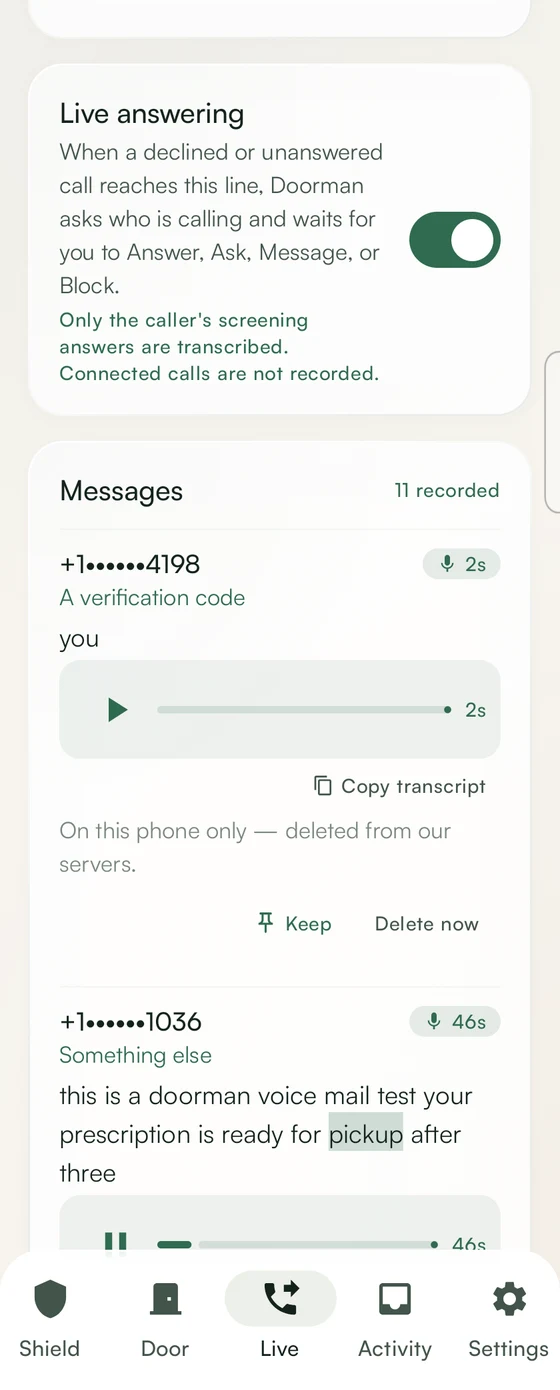
Your carrier forwards the calls you decline or miss to a number Doorman runs. Doorman picks up, says it's Doorman, and asks who's calling and why. What they say is written out and on your phone while they hold.

  • Answer. The call is put through to you. It is never recorded.
  • Message. They leave one, and you read it as text — or play it, the words lighting up as they're spoken, saved on your phone and nowhere else.
  • Block, or ask them a follow-up question first.

Every call leaves a receipt: put through, message, blocked, timed out or hung up. To change how the line behaves, ask Doorman in plain words — “only let approved callers ring” — and nothing changes until you confirm.

Forwarding is a setting with your carrier. We have tested it on T-Mobile; other carriers are unproven. What the line hears and keeps is on the privacy page.

The Live tab in Doorman, showing a caller's introduction with Answer, Message and Block.

You set it up once and then mostly forget about it.

  1. 1

    Shut the door

    One switch. People in your contacts still get through, alarms always do, and everything else waits its turn.

  2. 2

    Let someone in early

    Expecting the roofer? Add the number before they ring. Every other app here makes you wait to be bothered first and block them afterwards.

  3. 3

    Check it whenever

    The door writes things down instead of interrupting. A short note twice a day says what knocked, and you can switch that off. If you use the Live Line, it asks you while a caller is holding.

Also on your home screen, and your wrist.

A widget

Shows the Live Line's mode — Silent, Approved, Urgent or Closed — and changes it with a tap.

A watch app

A Wear OS companion to your phone: the door, recent knocks, the mode, and Ask Doorman from your wrist. It works with the phone, not without it.

We read a lot of one-star reviews before we set these.

Nearly all of them were about billing. So the part that costs us nothing to run isn't a subscription. Nothing is for sale yet; this is how it will work at launch.

Screening
Free

Calls to your own number, held and shown with the reason. Free, and staying that way.

The Door — at launch
$9.99 once

Texts, app notifications and the log. You'll pay once and that's the end of it. Fourteen days free first, and nothing happens on its own when they run out.

The Live Line
Price at launch

Private pilot, invite only. Founding members keep the price they join at. It will be a subscription, because we rent a real phone number for you every month, and you'll see the price before anyone can pay it.

Ask to join the pilot

Android only for now. No ads, no third-party analytics or crash reporting, and nothing sold.

The pilot

Android only, invite only. Email us to join.

Doorman runs on a handful of Android phones today, and we add people by hand. If you'd like to be one of them, write to us. There is no list and no newsletter; a person reads it and replies.

We keep your address only to reply, and it goes nowhere else — what that means.

Write to

hello@mydoorman.app

Tell us your phone and your carrier. We've tested the Live Line on T-Mobile; other carriers are unproven, and we'd still like to hear from you.

Email us to join the pilot